
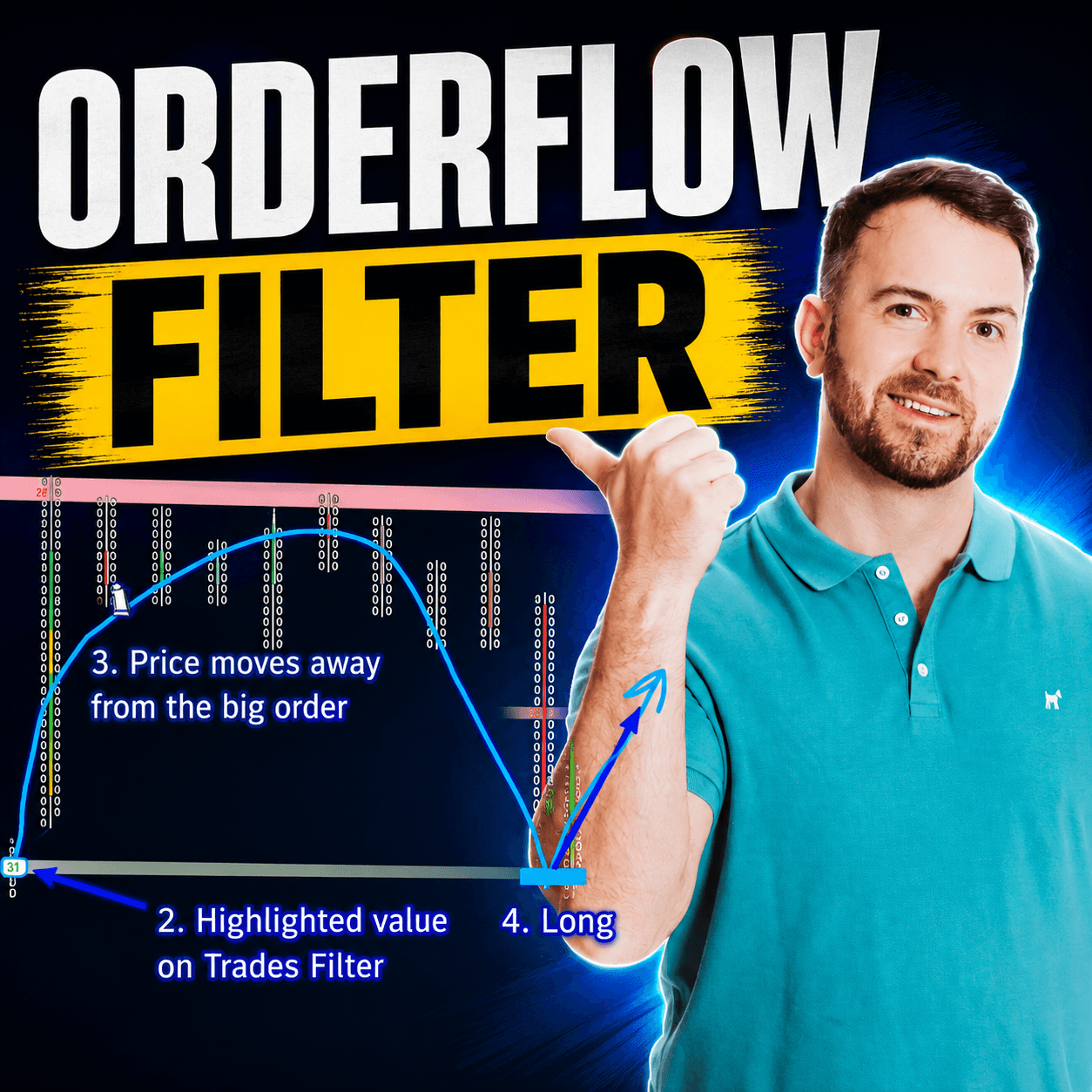
If you have ever watched a live order flow chart, you know how messy it can look. Hundreds of small trades fire off every second. It is easy to feel lost in the noise. This is exactly why a good order flow trade filter is one of the most useful tools you can add to your trading routine. Instead of watching every single trade, the filter hides the small, unimportant orders. It shows only the big ones. These big orders often come from banks, funds, and other large institutions. When you can see where these big players are stepping into the market, you get a much clearer picture. You start to see what is really happening behind the price action.
In this article, you will learn what an order flow trade filter is. You will also learn how to set one up on your own charts. Then you will see how to use it as the base for a simple, repeatable trading setup. We will walk through real examples so you can see how the filter behaves in different markets. By the end, you should feel confident adjusting your own filter. You will also feel more confident spotting the footprints that big institutions leave behind. This approach works whether you trade Forex, futures, or stocks. The same core logic applies across almost every order flow platform available today.
Table of Contents
The Article in 5 Points
- An order flow trade filter hides small trades and shows only large orders from institutions.
- You set the filter by adjusting the minimum trade size in your platform’s data settings.
- Every market needs its own filter size, since volume differs from one instrument to another.
- The core setup is simple: find a big order, wait for price to move away, then trade the pullback.
- It does not matter if the big trade happened on the bid or the ask side of the market.
What Is an Order Flow Trade Filter?
Why Every Order Flow Chart Feels So Noisy
Every market is full of small trades happening all the time. Retail traders buy one or two lots. Small algorithms fire tiny orders in and out. On their own, none of these trades tell you much about where the market is heading. The problem is that all of this activity creates noise, and noise makes it hard to see what actually matters.
This is where an order flow trade filter comes in. Think of it like a strainer in your kitchen. You pour in a mix of water and pasta, and the strainer only keeps the pasta. An order flow filter works the same way. You pour in every trade happening in the market, and the filter only keeps the large ones. What is left behind are the trades placed by big players. These include banks, hedge funds, and other institutions that move real size.
Why the Order Flow Trade Filter Matters for Your Trading
Why does this matter for your trading? Because large institutions do not hide easily. When a fund wants to buy or sell a big position, it has to place real orders in the market. Those orders leave a footprint. A trade filter lets you see that footprint directly. You no longer need to dig through thousands of small transactions first.
It is worth being clear about what the filter does and does not do. It does not predict the future. It does not guarantee that price will move a certain way just because a big trade appeared. What it does is give you a cleaner, simpler view of the market. This helps you focus your attention where it is more likely to matter. That clarity alone can make a big difference in how confident you feel reading a chart.
Most order flow platforms offer some version of this tool, even if the name or the exact settings look different. The logic behind the trade filter stays the same no matter which software you use.
How To Set Up Your Order Flow Trade Filter
Setting up the filter is simple once you know where to look, but the exact steps depend on your platform. Here is a general walkthrough based on a common order flow setup on a five minute EUR/USD chart.
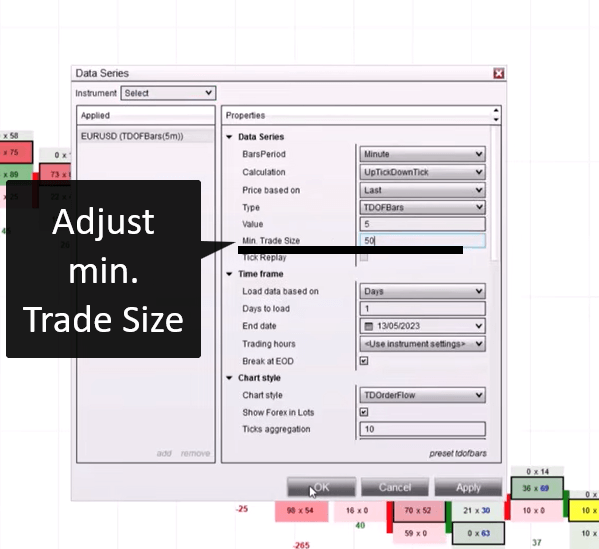
First, right click anywhere on your chart. Look for an option called Data Series, or something similar depending on your software. This is where the settings for how trades are displayed live.
Inside this menu, you will find a setting for the minimum trade size. This number controls how big a trade needs to be before it shows up on your chart. Set it low, such as 10 lots, and you will still see a lot of small activity. Raise it higher, and the smaller trades start to disappear, leaving only the larger orders behind.
A few practical tips make this process smoother:
- Start with a moderate number, then adjust up or down based on what you see.
- Watch how many trades remain visible after each adjustment.
- Aim for a filter that leaves a handful of clearly important trades, not zero and not dozens.
Many traders also like to change how the filtered trades are displayed. Switching the display mode to candles, for example, can make the chart easier to read compared to the default view. This is purely a visual preference and does not change how the filter itself works.
Once your order flow trade filter is set the way you like it, you generally will not need to touch it again for that specific market. This is a one time setup per instrument. It makes the whole process fairly low maintenance once it is dialed in.
Finding the Right Minimum Trade Size
There is no single number that works for every market, and this trips up a lot of traders when they first try this approach. EUR/USD, for example, trades very differently than a smaller currency pair or a thinly traded stock. A filter setting of 50 might be perfect for one instrument and completely wrong for another.
The best approach is trial and error. Your simple goal is to remove the noise without removing everything. If you set the filter too low, you will still see too many small trades cluttering the chart. The noise problem is not solved. If you set it too high, you might filter out so much that almost nothing is left. You end up missing useful information.
Here is a simple table showing how this trial and error process might look on a single market:
Minimum Trade Size | Result |
10 lots | Too much noise remains |
50 lots | Too strict, barely any trades show |
30 lots | Closer, but still a bit noisy |
35 lots | Clean and useful, few clear big trades |
Notice how the process moves back and forth. You do not need to get it perfect on the first try. The goal is simply to land on a number where the trades left on your chart look meaningfully large. They should stand out compared to everything around them.
Once you find a number that works, write it down. Different markets usually keep a fairly consistent range of typical trade sizes over time. Your filter setting should hold up reasonably well across many trading sessions. This means the effort you put into finding the right minimum trade size pays off again and again every time you pull up that chart.
The Order Flow Trade Filter Pullback Setup
Once your order flow trade filter is dialed in, you can use it as the foundation for a simple trading setup. The idea is straightforward, and it does not require complicated indicators or a long list of rules.
Step One: Spot a Large Trade
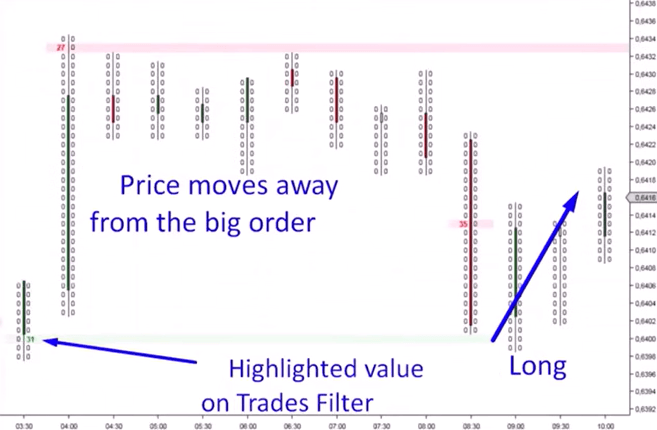
Look for a single trade that clearly stands out from everything around it. This might be one order of 30 or more lots, depending on your filter setting. The exact number is less important than the fact that it is obviously bigger than the surrounding activity. This is your signal that a large player is active at that price level.
Step Two: Watch Order Flow Move Away From the Trade
After the big trade appears, watch what price does next. In a healthy setup, price should move away from that level in one direction. If price moves upward after the large trade, that suggests buyers pushed things higher from that point. If price moves downward, sellers took control instead.
Step Three: Wait for the Order Flow Pullback
This is the part that requires patience. After price moves away from the big order, it often comes back toward that level before continuing. This return move is called a pullback, and it is the moment you are waiting for.
Step Four: Trade From the Level
If price moved up from the big order and then pulls back down toward it, that pullback is your potential long entry. If price moved down from the big order and then pulls back up toward it, that pullback is your potential short entry.
It helps to think of the big order as a kind of anchor point. Price often respects that level again when it returns. The level marks a spot where a serious player was clearly willing to trade in size. This setup will not work on every single occurrence, and that is normal. Some large trades simply will not produce a clean pullback. Some pullbacks will fall just short of the level before reversing. Treat each occurrence as one data point among many, not as a guaranteed signal. This keeps your expectations realistic.
Real Chart Examples of the Filter in Action
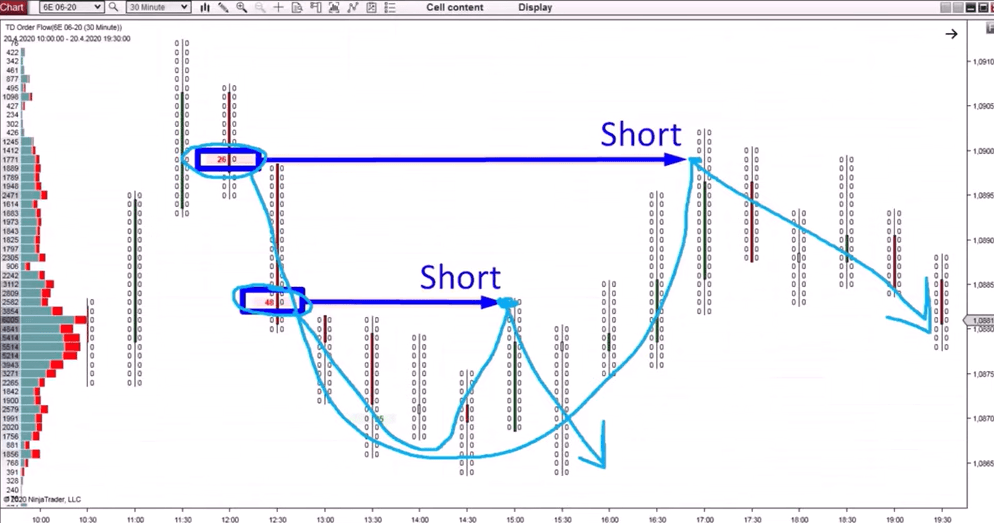
Seeing this play out on real charts makes the whole idea much easier to understand. In one example on a 30 minute timeframe, a single large trade appears. Price moves downward immediately after. A trader watching for this pattern would begin preparing for a short position. Then they wait for the pullback before actually entering.
In another case, a large order appears and price again drifts lower. A pullback follows shortly after. This offers a short entry from that returning move. The pattern repeats in a slightly different spot later in the session. This time, price moves upward from the big order, which sets up a potential long trade once the pullback arrives.
Not every large trade leads to a usable setup, and that is worth repeating. In one example, price approached the level after a pullback but turned around just one tick before reaching it. The setup simply did not trigger that time. This is a normal part of using any order flow trade filter. Some signals work out cleanly. Others do not quite complete. This is why patience and consistent rules matter more than any single trade outcome.
One detail worth noting from these examples is the timeframe. A 30 minute chart tends to filter out some of the smaller, faster moves. These smaller moves can create false signals on lower timeframes. At the same time, this timeframe still reacts quickly enough to catch meaningful pullbacks. Many traders find it to be a comfortable middle ground for this particular setup. Still, it is worth testing a few different timeframes to see what fits your own trading style.
Order Flow Trade Filter: Does Bid or Ask Matter?
A common question traders ask is whether it matters if the large trade occurred on the bid or the ask side of the market. The short answer is no, it does not matter for this setup.
Some traders assume that a big trade on the ask automatically means buyers are in control. They also assume a big trade on the bid means sellers are in control. In practice, this is not reliable enough to build a strategy around. A large trade can happen on either side and still lead to price moving in either direction afterward.
This becomes especially clear when trading Forex. In many Forex data feeds, large trades will show up on the bid side by default. This happens simply because of how the data is reported, not because of any real buying or selling pressure. If you read too much into the bid or ask label in this context, you would draw the wrong conclusions. That data was never meant to carry that meaning in the first place.
The simplest approach is to ignore the bid or ask label entirely. Focus on the two things that actually matter: the size of the trade, and what price does afterward.
Final Thoughts
An order flow trade filter turns a noisy, overwhelming chart into something you can actually read and act on. Instead of trying to make sense of thousands of small trades, you focus only on the ones large enough to matter. These are the trades most likely tied to real institutional activity. Setting one up takes only a few minutes inside your platform’s data settings. Once it is tuned to a specific market, it tends to keep working well over time without much adjustment. From there, the trading setup built on top of the filter is refreshingly simple.
Spot a large trade. Watch price move away from it. Wait for the pullback, then consider your entry from that returning move. It will not work every single time, and that is fine. No setup does. What matters is that you now have a clear, repeatable process for finding moments where big players are likely active. You no longer need to guess based on price movement alone. As you practice this on different markets, you will get better at reading which filter settings feel right. You will also get better at spotting which pullbacks look worth taking. Start small, test it on a demo account first, and give yourself time to get comfortable before applying it to live trading decisions.
Frequently Asked Questions
What is a good starting point for an order flow trade filter?
There is no universal number, since every market trades different volumes. A reasonable approach is to start around 10 to 20 lots, then raise or lower the setting until only a small number of clearly large trades remain visible on your chart.
Can I use this trade filter approach on any trading platform?
Yes. While the exact menus and terminology will vary between platforms, most order flow tools include some version of a minimum trade size setting. The underlying logic of filtering out small trades to reveal large ones stays the same across different software.
Why does my pullback setup sometimes fail to trigger?
Price does not always return cleanly to the level of a big order. Sometimes it turns around just before reaching it, and other times it overshoots. This is a normal part of trading, and no single filtered trade guarantees a specific outcome.
Ready To Go Deeper With Order Flow?
If you want to keep building on what you learned here, take a look at our related guides on order flow volume absorption and order flow failed auction for more ways to read institutional activity on your charts. You can also explore our full breakdown of order flow volume clusters to round out your understanding of how big players leave footprints in the market. For a structured way to learn order flow trading from the ground up, check out our full course and start applying these tools to your own charts today.

oy43sf
klcrgc